✏️
Lápiz y marcadorPen & highlighter
Trazo libre con presión de stylus y marcador translúcido para resaltar sin tapar.Free-hand strokes with stylus pressure, plus a translucent highlighter that emphasizes without covering.
ScreenPencil convierte tu pantalla en una pizarra. Resalta, dibuja flechas, escribe, haz zoom y captura — encima de cualquier app, en tus presentaciones, clases y demos en vivo. En tu PC, tu Mac y ahora también en tu Android.ScreenPencil turns your screen into a whiteboard. Highlight, draw arrows, type, zoom and capture — over any app, during your live presentations, classes and demos. On your PC, your Mac and now on your Android too.
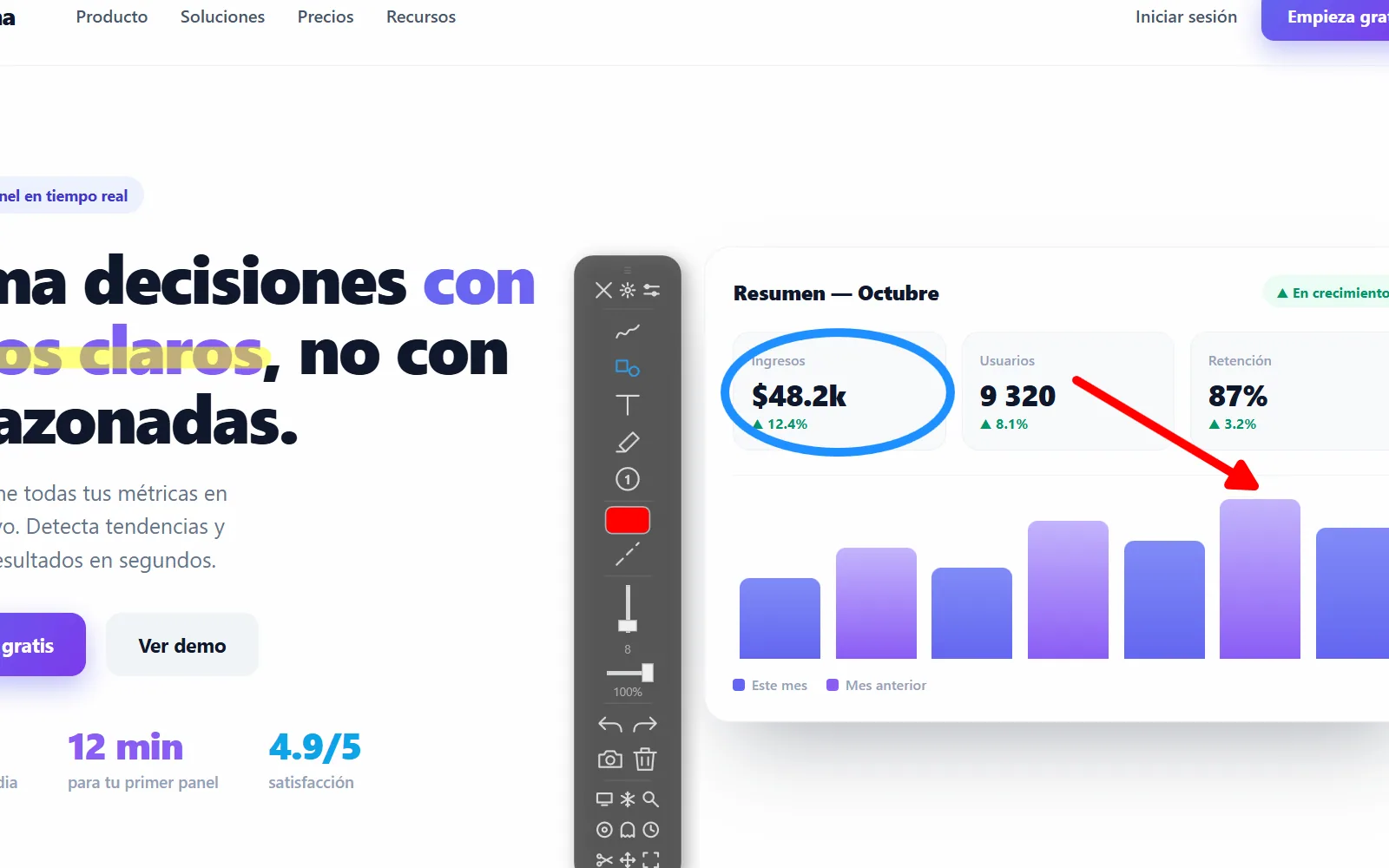
Un conjunto completo de herramientas de anotación, sin esconder nada detrás de un muro de pago.A complete set of annotation tools, with nothing hidden behind a paywall.
Trazo libre con presión de stylus y marcador translúcido para resaltar sin tapar.Free-hand strokes with stylus pressure, plus a translucent highlighter that emphasizes without covering.
Líneas, flechas, rectángulos y elipses con vista previa. Edítalas después de crearlas.Lines, arrows, rectangles and ellipses with live preview. Edit them after you draw them.
Escribe encima de la pantalla con fuente y contorno, y numera pasos con badges.Type over the screen with font and outline, and number steps with badges.
Oscurece todo menos una zona — círculo o rectángulo con borde suave — para enfocar la atención.Dim everything except one area — circle or rectangle with a soft edge — to focus attention.
Una lente que amplía cualquier detalle. Ajusta el zoom con la rueda del ratón.A lens that magnifies any detail. Adjust the zoom with the mouse wheel.
Cambia a un lienzo opaco cuando necesites partir de cero, sin perder tus trazos.Switch to an opaque canvas when you need a clean start, without losing your strokes.
Congela la pantalla para anotar sobre algo en movimiento (un vídeo, una animación).Freeze the screen to annotate over something moving (a video, an animation).
Un overlay por pantalla con undo e historial compartidos. HiDPI y 4K nativos.One overlay per screen with shared undo and history. Native HiDPI and 4K.
Exporta a PNG con tus anotaciones o cópialas al portapapeles con un atajo.Export a PNG with your annotations or copy them to the clipboard with a shortcut.
Paleta rápida, selector HSV, opacidad y grosor — recordados por herramienta.Quick palette, HSV picker, opacity and thickness — remembered per tool.
Historial unificado de todos tus trazos y figuras. Limpia todo con una sola acción.Unified history of all your strokes and shapes. Clear everything with a single action.
Activa el modo dibujo o cualquier herramienta sin tocar la app. Todos reasignables.Trigger drawing mode or any tool without touching the app. All reassignable.
Interfaz en español, inglés, portugués, chino, ruso, italiano y francés — cambia al vuelo.Interface in Spanish, English, Portuguese, Chinese, Russian, Italian and French — switch on the fly.
La barra de herramientas se oculta de las grabaciones y de la pantalla compartida: tus anotaciones se ven, la interfaz no.The toolbar hides from screen recordings and screen sharing: your annotations show, the UI doesn't.
Ghost (los clics atraviesan), trazo efímero (se desvanece solo) y un halo para resaltar el cursor.Ghost (clicks pass through), ephemeral ink (it fades on its own) and a halo to highlight the cursor.
Pulsa una herramienta y mira una muestra real hecha con la app.Tap a tool and see a real sample made with the app.
Vive en la bandeja del sistema. No interrumpe tu trabajo hasta que lo necesitas.It lives in the system tray. It doesn't interrupt your work until you need it.
ScreenPencil arranca silencioso en la bandeja del sistema. Tu pantalla sigue 100% usable: clic, scroll, todo pasa a través.ScreenPencil starts silently in the system tray. Your screen stays 100% usable: click, scroll, everything passes through.
Pulsa el atajo global y un overlay transparente cubre toda la pantalla. Ahora todo lo que dibujes queda encima.Press the global shortcut and a transparent overlay covers the whole screen. Now everything you draw stays on top.
Ctrl·Alt·DElige una herramienta de la barra flotante: lápiz, flecha, texto, spotlight, lupa… Resalta lo importante en vivo.Pick a tool from the floating bar: pen, arrow, text, spotlight, magnifier… Highlight what matters, live.
P A T LGuarda un PNG con tus anotaciones, cópialo al portapapeles, o limpia y vuelve al trabajo. Tus trazos se conservan hasta que decidas.Save a PNG with your annotations, copy it to the clipboard, or clear and get back to work. Your strokes stay until you decide.
Ctrl·Alt·SLa barra lateral es la misma de la app. Aquí funcionan el lápiz, el marcador y el borrador — el resto trabaja sobre toda tu pantalla, en la app de verdad.The side toolbar is the one from the app. Pen, highlighter and eraser work right here — the rest works over your entire screen, in the real app.
✦ Mantén pulsado y arrastra para dibujar · la barra se mueve desde el asa de arriba✦ Press and drag to draw · move the toolbar from the grip at the top
Atajos globales reasignables y una tecla por herramienta. Sin tocar el ratón.Reassignable global shortcuts and one key per tool. Without touching the mouse.
Todos los atajos globales son reasignables desde Ajustes.All global shortcuts are reassignable from Settings.
El mismo lienzo, la misma sensación — en el escritorio y ahora también en el móvil.The same canvas, the same feel — on the desktop and now on mobile too.
Compilación nativa con .NET y WPF. Per-monitor DPI, multi-monitor y bandeja del sistema. En la Microsoft Store (firmada por Microsoft y con actualización automática) o como instalador .exe.Native build with .NET and WPF. Per-monitor DPI, multi-monitor and system tray. On the Microsoft Store (signed by Microsoft, updates itself) or as an .exe installer.
DisponibleAvailableLa experiencia de anotación que inspiró el proyecto, ahora abierta y gratuita. Ya en la Mac App Store.The annotation experience that inspired the project, now open and free. Now on the Mac App Store.
DisponibleAvailableOverlay, dibujo y atajos sobre X11 (GNOME, KDE, XFCE). Descarga self-contained; la captura está en fase experimental.Overlay, drawing and shortcuts on X11 (GNOME, KDE, XFCE). Self-contained download; capture is in an experimental stage.
ExperimentalExperimentalBarra flotante sobre cualquier app: lápiz, marcador, láser, figuras, texto, pizarra y captura a la galería. En Google Play desde Android 8.0.Floating toolbar over any app: pen, highlighter, laser, shapes, text, whiteboard and capture to your gallery. On Google Play from Android 8.0.
DisponibleAvailableSin pruebas que caducan, sin funciones bloqueadas, sin tarjeta de crédito. Cada herramienta incluida.No trials that expire, no locked features, no credit card. Every tool included.
En la Microsoft Store el paquete lo firma Microsoft: se instala sin el aviso de SmartScreen y se actualiza solo. Requiere Windows 10 (build 17763) o superior, x64. El .exe trae la misma versión v0.2.1.On the Microsoft Store the package is signed by Microsoft: it installs with no SmartScreen warning and updates itself. Requires Windows 10 (build 17763) or later, x64. The .exe ships the same v0.2.1 build.
Android 1.0.2 en Google Play · requiere Android 8.0 o superior.Android 1.0.2 on Google Play · requires Android 8.0 or later.
Linux es self-contained (X11). La captura aún es experimental; el resto funciona. Más detalles.Linux is self-contained (X11). Capture is still experimental; everything else works. More details.
ScreenPencil seguirá siendo 100% gratis y sin paywall. Si te ahorra tiempo en tus clases, demos o presentaciones, una donación nos ayuda a mantenerlo y traerlo a más plataformas. Cada café cuenta ☕.ScreenPencil will stay 100% free and paywall-free. If it saves you time in your classes, demos or presentations, a donation helps us maintain it and bring it to more platforms. Every coffee counts ☕.
Sin presión: usar y compartir ScreenPencil también es una gran forma de apoyar 💜No pressure: using and sharing ScreenPencil is also a great way to support 💜
Sí, completamente gratis y sin truco. No hay versión 'Pro', ni suscripción, ni funciones bloqueadas. Es un proyecto de código abierto para educadores, creadores y equipos que presentan a diario.Yes, completely free and no catch. There's no 'Pro' version, no subscription, no locked features. It's an open-source project for educators, creators and teams who present every day.
Windows 10/11 (en la Microsoft Store o con instalador .exe), macOS (en la Mac App Store) y Android 8.0 o superior (en Google Play) ya están disponibles. Para Linux hay una descarga self-contained sobre X11: el overlay y el dibujo funcionan, la captura sigue siendo experimental.Windows 10/11 (on the Microsoft Store or with an .exe installer), macOS (on the Mac App Store) and Android 8.0 or later (on Google Play) are available. For Linux there's a self-contained X11 download: the overlay and drawing work, capture is still experimental.
Las dos vías traen la misma versión (v0.2.1) y exactamente las mismas funciones. La Microsoft Store es la recomendada: Microsoft firma el paquete, así que se instala sin el aviso de SmartScreen y la app se actualiza sola. Pide Windows 10 (build 17763) o superior en x64. El instalador .exe del repositorio de releases está ahí para equipos sin Store o si prefieres controlar tú las actualizaciones.Both routes ship the same version (v0.2.1) and exactly the same features. The Microsoft Store is the recommended one: Microsoft signs the package, so it installs with no SmartScreen warning and the app updates itself. It needs Windows 10 (build 17763) or later on x64. The .exe installer from the releases repo is there for machines without the Store, or if you'd rather control updates yourself.
Casi todo: lápiz, marcador, láser, líneas, flechas, rectángulos, elipses, texto, borrador, selección, pizarra, deshacer/rehacer y captura que se guarda en tu galería — con la barra flotando sobre cualquier app. Puedes dejar que los toques pasen a la app de abajo y arrancarla desde el mosaico de Ajustes rápidos. Lo que aún no está en el móvil: spotlight, lupa y freeze.Almost everything: pen, highlighter, laser, lines, arrows, rectangles, ellipses, text, eraser, selection, whiteboard, undo/redo and a capture that saves to your gallery — with the toolbar floating over any app. You can let taps pass through to the app underneath and start it from the Quick Settings tile. Not on mobile yet: spotlight, magnifier and freeze.
Tres: mostrar sobre otras apps, para pintar la capa de anotación encima; una notificación mientras el overlay está activo, que es lo que Android exige a los servicios en primer plano; y la captura de pantalla, que se activa solo cuando pulsas el botón de cámara. No hay cuentas, anuncios ni analítica, y nada sale de tu teléfono. Todo el detalle en la política de privacidad.Three: display over other apps, to paint the annotation layer on top; a notification while the overlay is running, which is what Android requires of foreground services; and screen capture, which only kicks in when you tap the camera button. There are no accounts, ads or analytics, and nothing leaves your phone. Full detail in the privacy policy.
Nunca. Las capturas PNG salen limpias, exactamente como ves la pantalla con tus anotaciones. Puedes guardarlas o copiarlas al portapapeles.Never. PNG captures come out clean, exactly as you see the screen with your annotations. You can save them or copy them to the clipboard.
No. En reposo el overlay es click-through: el ratón pasa a través como si la app no existiera. Solo al activar el modo dibujo la pantalla se vuelve un lienzo.No. At rest the overlay is click-through: the mouse passes through as if the app didn't exist. Only when you turn on drawing mode does the screen become a canvas.
Sí, en escritorio. Un overlay por pantalla con historial y deshacer compartidos, y soporte per-monitor DPI para que los trazos se vean nítidos en HiDPI / 4K.Yes, on desktop. One overlay per screen with shared history and undo, plus per-monitor DPI so strokes look crisp on HiDPI / 4K.
Sí, en escritorio: todos los atajos globales son reasignables desde Ajustes → Teclas de acceso rápido, y se guardan en tu perfil. Pensado para teclados en español / LATAM. En Android todo se maneja desde la barra flotante.Yes, on desktop: all global shortcuts are reassignable from Settings → Keyboard shortcuts, and they're saved to your profile. Designed for Spanish / LATAM keyboards. On Android everything is handled from the floating toolbar.
Por supuesto. Uso personal, educativo y comercial, sin restricciones ni licencias que comprar.Absolutely. Personal, educational and commercial use, with no restrictions or licenses to buy.
El núcleo ya está completo y es gratis en las cuatro plataformas. Seguimos puliendo — esto es lo siguiente.The core is complete and free on all four platforms. We keep polishing — here's what's next.
Coloca un badge con un número concreto justo bajo el cursor.Drop a badge with a specific number right under the cursor.
Elige la orientación de la barra de herramientas.Choose the orientation of the toolbar.
Exporta o copia la pantalla activa o todas a la vez.Export or copy the active screen or all of them at once.
Junta varias capturas y expórtalas a un PDF.Combine several captures and export them to a PDF.
Doble clic para reescribir, mover o cambiar el tamaño.Double-click to rewrite, move or resize it.
Selector radial rápido bajo el cursor.A quick radial picker under the cursor.
Llevar al móvil los modos de foco que hoy solo están en escritorio.Bring the focus modes that are desktop-only today to mobile.
Que la app de escritorio se actualice sola, en segundo plano.Let the desktop app update itself in the background.
Descarga ScreenPencil y empieza a dibujar sobre tu pantalla en menos de un minuto.Download ScreenPencil and start drawing over your screen in under a minute.
Descargar gratisDownload free